Mobile · iOS · SwiftUI
Leopard iOS App
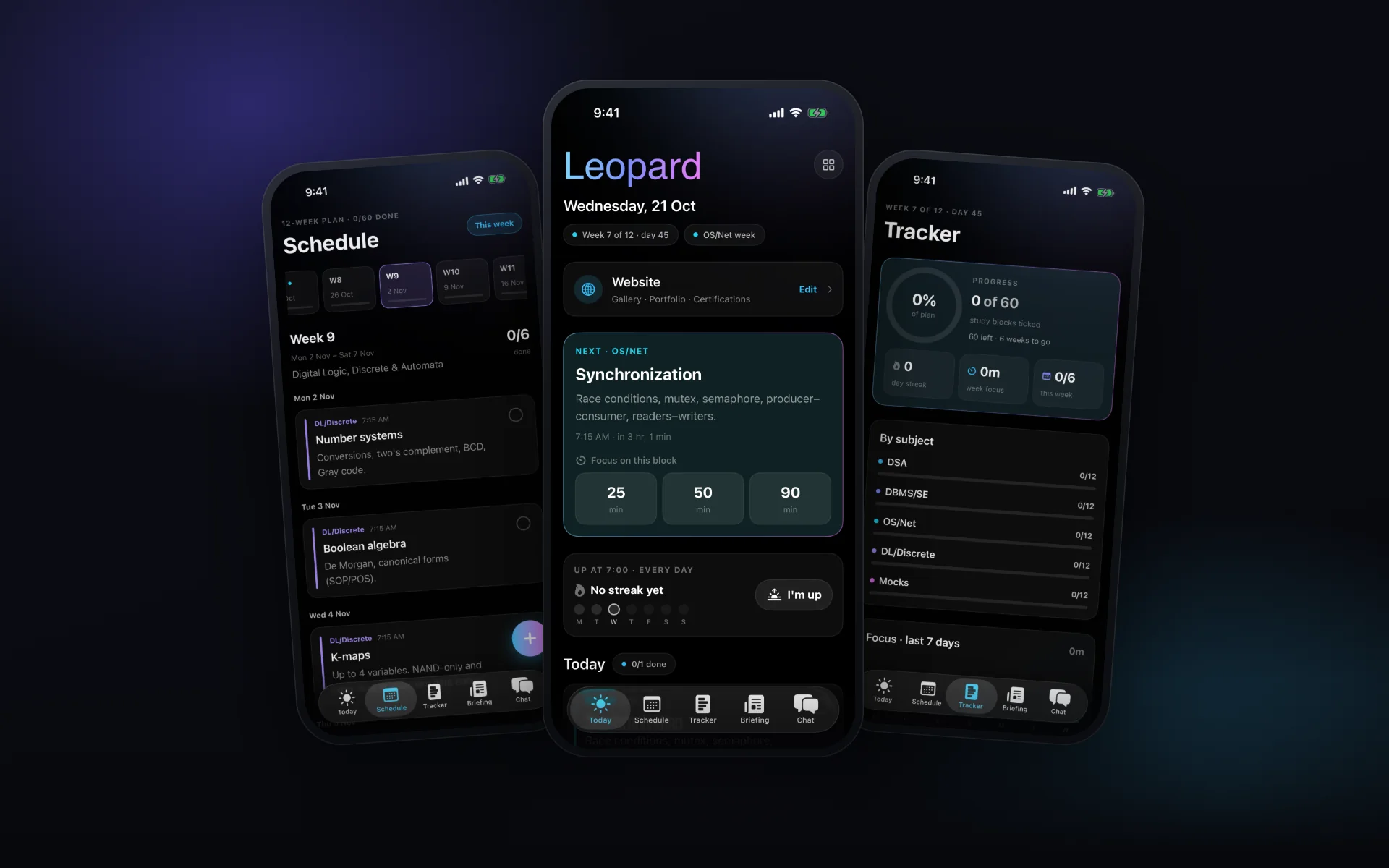
Leopard is the app I open every morning, built natively in SwiftUI for iOS 15 so it runs on an iPhone 7. It turns a 12-week study plan into local notifications with a focus timer and progress tracking, reads a daily news and football briefing prepared by a server job, carries a native private chat, and doubles as a console for everything I run: Vercel deployments, GitHub, Supabase, Resend, uptime, Search Console, and the content of this website.
- Role
- Designer & iOS developer
- Client
- Own product
- Timeline
- Jun 2026 – present
- Year
- 2026
Native SwiftUI for iOS 15, with no third-party packages
Hand-written Supabase Realtime client for the private chat
Edits this portfolio: gallery, projects, and certifications
Overview
I wanted one place on my phone for what I actually do each day: work through a study plan, protect focus time, catch up on the news, keep a private conversation going, and watch over the sites and services I run. Leopard started as a study-reminder app and grew into that place, built for the phone I carry, an iPhone 7 on iOS 15.
What I built
A SwiftUI app with five tabs (Today, Schedule, Tracker, Briefing, and Chat) and a Console. Study state lives on the device and reminders are scheduled locally, so the core of the app works with no server and no signal. The briefing is written once a day by a cron job on this site and stored in Supabase; the app reads it with the public key and keeps a copy for offline mornings.
The chat began as a web view of the site's messenger, but loading the Next.js bundle on an iPhone 7 took seconds on every cold start. I rewrote it natively, including a small Supabase Realtime client with no dependencies, and kept the web layer only for WebRTC calls. The Console talks to each service with tokens from the Keychain, while anything that needs a server secret, like Search Console data or editing this site, goes through dedicated routes on iamleopard.com.
Built for older hardware
iOS 15 lacks several newer SwiftUI APIs, so the app carries small shims instead of raising its minimum version. The focus timer stores when it ends rather than ticking a counter, so it stays right after the app is suspended or killed. XCUITest flows drive Today, Schedule, Tracker, and the chat end to end on the simulator and capture screenshots for visual review.
Key features
Today screen with the current study block, a 25, 50 or 90-minute focus timer that survives the app being killed, a morning check-in streak, and personal tasks
A 12-week plan delivered as local notifications, refilling iOS's 64-notification window every time the app opens
Schedule and Tracker: week-by-week blocks to tick off, progress by subject, streaks, and a 7-day focus chart
Daily briefing of news stories with short summaries plus football standings and fixtures, cached for offline reading
Native private chat on a Supabase Realtime (Phoenix v2) client written over URLSessionWebSocketTask, with presence and cached photos
Console for Vercel deployments, GitHub, Supabase projects, Resend email, uptime checks, Search Console, and a Kanban board
Content admin for iamleopard.com: photos upload straight to Supabase Storage and the site regenerates on the next visit
Service tokens live only in the iOS Keychain; anything that needs a server secret goes through narrow bearer-token routes
Built with
Have a project like this?
I take products from first sketch to shipped, design, build, and the AI in between. Tell me what you’re working on.